Location Sharing
Location sharing is an option that can be turned on if want to share your location with other people and view these within the app. Location sharing is possible anywhere you have a data connection. If you have a satellite (starlink) enabled data plan then you will be able to share your location using this network as well. For REST api options see below.
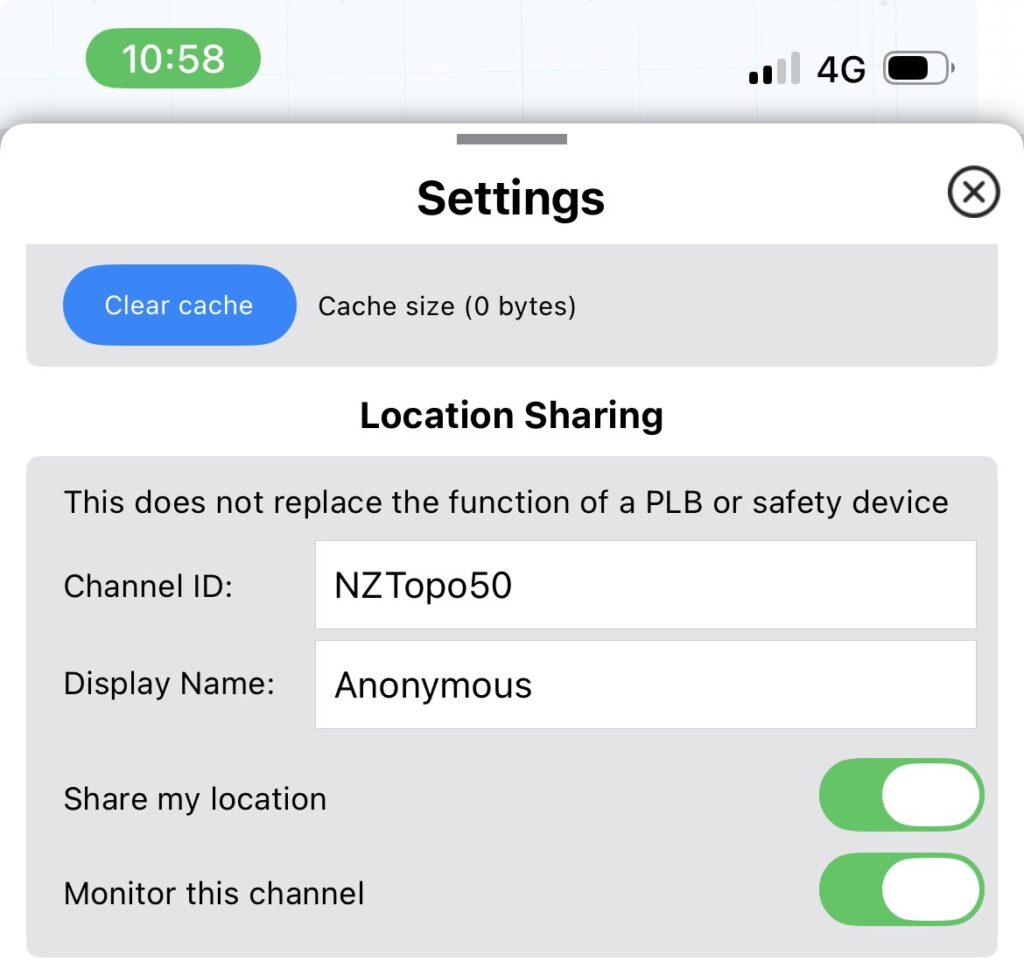
To turn on location sharing, look for ‘Location Sharing’ under the Settings page. Choose a Channel ID (this can be any string of characters and numbers) to share on, and Display Name to share, and then turn on ‘Share my location’. Share the Channel ID with people you want to share your location with. Turn on ‘Monitor this channel’ if you want to see other people who are on this channel.
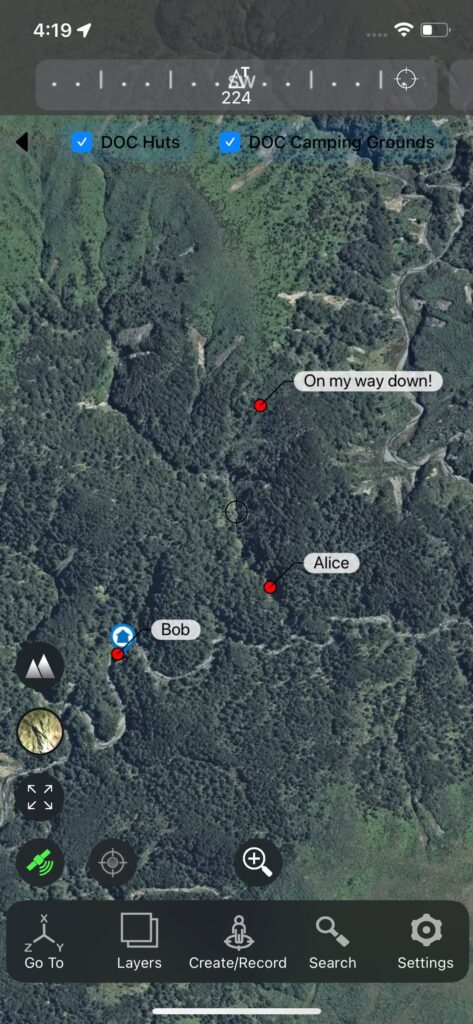
If you have ‘Monitor this channel’ turned on then all locations on the Channel ID you are using will display on the map. These will update as new locations become available. Note that some locations may be old if there are no recent locations being uploaded (for example if sharing is turned off or they no longer have a network connection).
Advanced settings
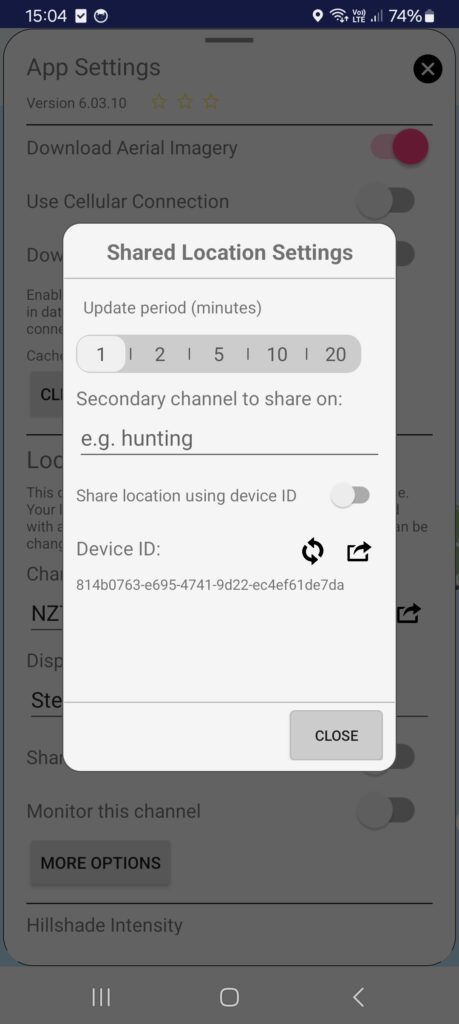
Tap the ‘More Options’ button for advanced settings.
Adjust the time interval for location updates as required. Less frequent updates may help with battery life.
Use the Secondary channel option to share your location on another channel at the same time. Location sharing needs to be turned on and locations will be sent to anyone using either of the primary or secondary channels. Clear the text in this box to stop sharing on the secondary channel.
‘Share location using device ID’ can be turned on if you want your shared locations accessibly through the device ID. This is useful, for example, for making your location accessible to third party sharing and/or event management sites (e.g. the same as Garmin in-reach MapShare/Live Tracking). The device ID share button will create your unique link to your device location.
Remote viewing
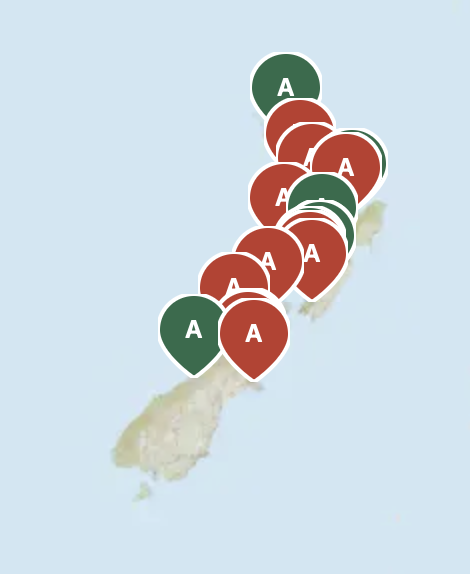
For those at home, group locations can also be viewed through a web browser through our website. You will need to know the channel ID. The Channel ID share button in the app can be used to share a link to the website view, or to share the channel with other app users.
Notes on data privacy and how it works
If you leave location sharing turned off then no location information is shared from within the app!
If you choose to turn it on, then your GPS location (easting, northing, altitude) along with the Channel ID, the display name you have chosen, and a random id number, are sent to our server. This information is anonymous and we have no way to connect the information sent with you personally (you’ll have noticed that you don’t need an account to use the NZTopo50 app). The id number is only used to connect one location update with previous ones from the same phone and differentiate it from other people sharing locations on the same channel. The text you use for your display name is shared but can be any string of characters and numbers and doesn’t need to include any real names (unless you want these shared as well).
Once locations are received by our server, they are then shared with anyone who monitors the same channel ID. Channel ID’s are not published publicly anywhere so if you choose an obscure channel ID name and only share it with closed contacts then it is unlikely that anyone else will randomly obtain access to those locations. None-the-less, this is the only filter used for distributing locations. By choosing a channel ID you don’t own or control it, anyone using the same ID will share this channel with you.
Only the most recent location shared is stored on our system, and if no further locations are updated in a 24 hour period then this location is removed as well.
Other systems (like the map interface on this website) will also be able to request location information for a specific Channel ID. This works with the same restrictions as the phone app, and requires a known channel ID in advance.
REST api
Group locations can be accessed through a public api. The server is located here: https://locationserver.sqrl.net
| Endpoint | Access | Description |
| /ping | public | |
| /share/channel/:ch | public | returns a GeoJSON feature collection of WGS84 locations, as well as NZTM2000 easting, northing, altitude |
| /share/user/:uid | public | returns a GeoJSON feature with WGS84 location for the given device ID. Device ID access needs to be enabled in the app. |
If you need to manage a group of devices then talk to us for an api key. ‘Share location using device ID’ must be turned on in the app for each device, and location sharing needs to be activated by the device user. The group management api can be used to share locations between a group of controlled devices. This can be done in parallel with any channel sharing enabled on the device, or can be made exclusive to the group overriding channel settings.
The api key is included in the bearer header. Device locations can be monitored through the uid public endpoint.
| Method | Endpoint | Description | Body | Response |
GET | /groups | List groups owned by this API key | None | { "label": "...", "groups": [...] } |
| GET | /share/group/:group_id | List locations in group | {“group_id”: “…” } | GeoJSON feature collection |
PATCH | /apikey/label | Rename current API key label | { "label": "..." } | { "ok": true, "label": "..." } |
POST | /group/create | Create a new group | { "name": "...", "exclusive": false } | { "ok": true, "group_id": "...", "exclusive": false } |
PATCH | /group/:group_id | Update group name/exclusive flag | { "name": "...", "exclusive": false } | { "ok": true } |
DELETE | /group/:group_id | Delete a group | None | { "ok": true } |
POST | /group/:group_id/member | Add device (uid) to group | { "uid": "..." } | { "ok": true } |
DELETE | /group/:group_id/member/:uid | Remove device (uid) from group | None | { "ok": true } |